I have a Hikvision DVR recording four cameras around the clock. It works perfectly. What bothered me was how you were expected to watch it.
The two options were these. One: the phone app, which works, but leaves you squinting at four cameras on a six-inch screen. Two: install iVMS-4200, Hikvision's desktop client, which only exists for Windows and is exactly the kind of program you do not want on your machine — heavy, with its own installer, its own update mechanism and its own ideas about what an application should look like.
I work on Linux. And even if I worked on Windows the question would be the same: why do I have to install anything to look at a device sitting ten metres away on my own network?
What I wanted was fairly modest: open a browser and see the cameras. On any machine, on any OS, with nothing installed.
And that is where the dead plugin shows up
Because the DVR does have a web interface. You hit its IP and there it is. The problem is that the video depends on an ActiveX/NPAPI plugin, and that plugin runs nowhere today: Internet Explorer is dead, the Chrome extensions that emulated it were pulled from the store, and the desktop plugin only ever existed for Windows.
So the path I wanted — the browser — was walled off. Not because it was impossible, but because the only implementation that existed had rotted over the years.
That is the problem I ended up solving: not "watch the cameras", which you already could, but watch them without tying myself to one operating system or an installer.
The plugin is dead, the protocols are not
Here is what unlocked the whole thing. What expired is the interface, not the device. The DVR still speaks two open protocols that Hikvision ships on practically every unit it makes:
- RTSP (port 554) for video.
- ISAPI, its REST API, for everything else: listing cameras, searching motion events, pulling recordings, renaming channels.
So the functionality was all there, exposed, half-documented but reachable. The only missing piece was something to consume it and render it in a browser.
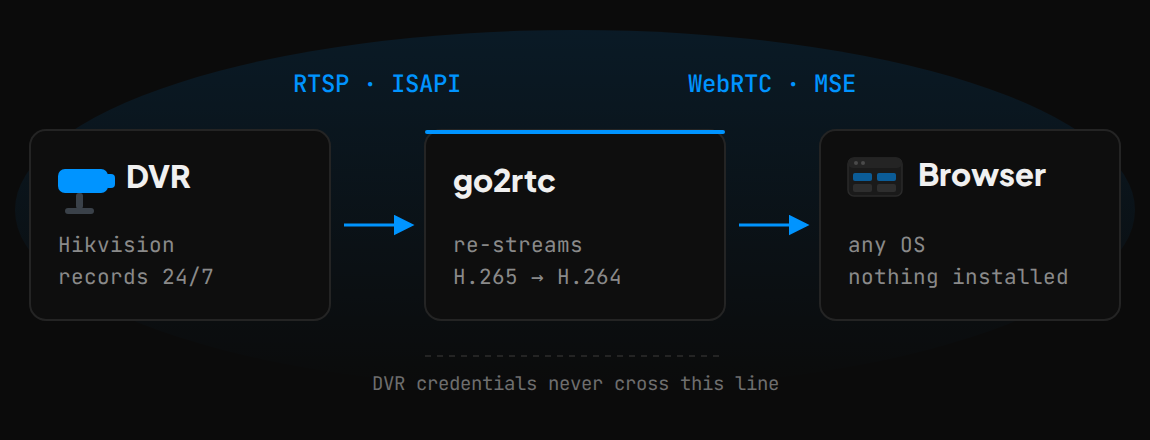
go2rtc pulls the DVR's RTSP streams and re-serves them as WebRTC, sub-second latency, with automatic MSE/HLS fallback. On top sits a Next.js app that speaks ISAPI server-side with digest auth — the DVR credentials never reach the browser.
One docker compose up and a setup wizard on first boot. No config files to hand-edit.
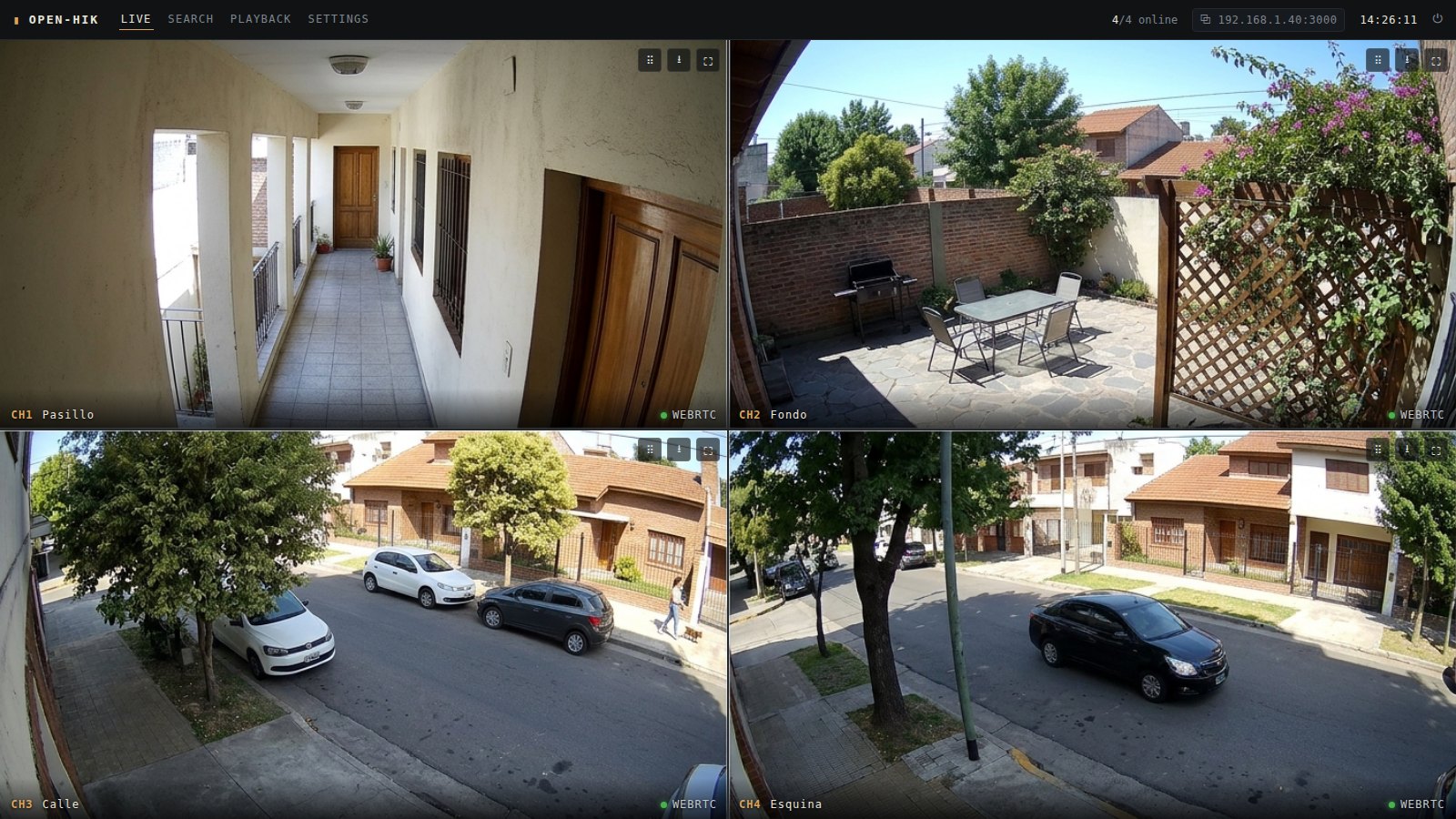 The live grid. Double-click any camera to take it fullscreen on the full-quality stream.
What it ended up doing, beyond showing the cameras
The grid alone would have been enough for me, but once ISAPI is on the other end you realise the DVR knows far more than it shows, and half of these came almost for free.
- Smart search. Pick a time range and it returns a grid of thumbnails, one per motion event the DVR logged. On AcuSense units you can filter by people or vehicles, so "what happened between two and five in the morning?" stops being three hours of video and becomes nine thumbnails. Click one and it takes you to that moment; download it as MP4 if you want.
- Recording playback. Browse what was recorded per camera and per day, with real transport controls: play/pause, slow motion (0.25x and 0.5x), skip buttons and a scrubbable timeline. Fast-forward is done by skipping rather than 2x, because the DVR serves recordings in real time and there is no way to ask it to hurry.
- Live alerts. Motion, tamper or video loss highlights the affected camera as it happens, read straight from the DVR's own alert stream.
- Drag and drop to rearrange. Drag a camera and drop it on another, so the ones covering the same area sit side by side. The layout is saved and shared across every device that opens the app, not just the browser where you changed it.
- Rename cameras. Edit the name in the grid and it is saved to the DVR, not to the app — open the original interface later and the new name is there.
- Snapshots. One click gets you a full-quality JPEG of any camera.
- Setup wizard and login. The first visit walks you through it: create the app password, point it at the DVR, and a connection test tells you what it found. After that everything sits behind that login, and the DVR connection can be reconfigured from Settings whenever the device changes IP.
Everything that is not live video goes through ISAPI server-side. If the DVR stops answering ISAPI the grid keeps working and the extras degrade on their own without taking the screen down with them.
The afternoon Stream Encryption ate
I am writing this one down because it is the worst kind of bug: the kind that makes you doubt your whole stack.
I connected the streams. go2rtc said they were connected. And the video was undecodable garbage. ffmpeg was throwing things like:
vps_reserved_three_2bits is not three
non-intra slice in an IDR NAL unit
Those errors mean "the header bits do not hold the values the standard requires". Which, coming from a device that has been recording cleanly for years, makes no sense at all.
I tried everything: other codecs, another RTSP client, VLC, lower resolution. Nothing. Video left the DVR, arrived, and was noise shaped like video.
It turned out the device had Stream Encryption enabled, a Hik-Connect feature. The RTSP payload is encrypted and only Hikvision's own apps can decrypt it. RTSP username and password auth keeps working exactly as before — this is an encryption layer on top, announced nowhere, that breaks any third-party client.
You turn it off in Configuration → Network → Platform Access → Stream Encryption. One checkbox. Half an afternoon.
H.265: the browser cannot decode it
The second problem was more interesting, because the obvious fix was the bad one.
No browser decodes H.265/HEVC over WebRTC or MSE. Leave a camera on H.265 and most machines show nothing. And sometimes they do — if the PC has hardware HEVC decoding — which is where the classic "works on my machine" comes from.
The direct fix is to transcode: go2rtc wraps the stream in ffmpeg:...#video=h264 and you are done. It works. And it is expensive, because with four cameras in the grid the server is re-encoding four streams permanently.
What solved it was remembering that every camera has two streams, and each has its own codec setting:
| Stream | Used for | Recommended codec | Why |
|---|---|---|---|
Main (x01) |
DVR recording + fullscreen | H.265 | Half the disk of H.264 at the same quality: twice the days of history. |
Sub (x02) |
Live grid | H.264 | Every browser plays it, so the grid transcodes nothing. The sub stream is not recorded, so it costs no disk. |
With that setup only the camera you open fullscreen gets transcoded. The rest of the time the server re-encodes nothing.
The best part is that you do not need to open the DVR's own web UI to change it: I put it behind a button in Settings → Stream encoding. It changes the codec only — resolution, frame rate and bitrate stay as they were — and re-registers the streams.
The DVR has a bandwidth budget
Another one I did not see coming: these units have a hard outgoing limit, shared between live view, playback and smart-search thumbnails. When you exceed it, it does not degrade gracefully: you get a 453 Not Enough Bandwidth and that is that.
That is why the grid uses sub streams and thumbnail extraction runs one at a time rather than firing everything off in parallel. It is not a performance optimisation, it is what keeps the DVR from cutting you off.
Then its relative showed up: stuttering video on Wi-Fi. Re-encoding H.265→H.264 with no bitrate cap balloons each stream to about 2.5 Mbps — ten megabits for a four-camera grid, which Wi-Fi drops. The ffmpeg block in go2rtc.yaml now caps it (≈800 kbps on the sub, 2500 on the main) and shortens the keyframe interval so loss recovers fast.
How much of this did Claude write
I built it with Claude Code, and I want to be precise about which part it did, because the fashionable claim is that this all writes itself now, and my experience here was a lot more specific than that.
What it handled very well: all the skeleton. The Next.js app, the setup wizard, the ISAPI client with digest auth, the playback transport controls, drag-and-drop grid reordering, the docker-compose. That is known code with established patterns, and it comes out fast and correct. It was also good at reading ffmpeg errors and proposing hypotheses for those cryptic messages.
What it did not solve, and could not: the three problems above. None of them is a coding problem. They are undocumented behaviour of one specific device sitting in my house. That Stream Encryption exists and breaks third-party clients is written nowhere a model has read. Neither is the DVR's bandwidth budget. You find those with a hypothesis, the hardware in front of you, and testing.
The shape the work settled into was exactly that: I investigated against the hardware, Claude turned each finding into working code. A fast loop where the slow part was always mine.
Eleven commits between July and November, working in bursts. I would not have finished it writing every line by hand.
Try it
You need Docker and a Hikvision device with RTSP enabled on your network.
git clone https://github.com/gastonnrodriguez/open-hik.git
cd open-hik
./scripts/up.sh --build
scripts/up.sh auto-detects the machine's LAN IP and passes it to go2rtc as the WebRTC candidate, so live view works from other devices on the network and not only from the host. That was the part of WebRTC that took me longest to understand: without that candidate, other machines fall back to MSE.
Then open http://localhost:3000 and follow the wizard.
I tested it against an iDS-7204HQHI-M1/S, but it should work with any Hikvision that speaks RTSP and ISAPI — which is nearly all of them. If you run it against another model, tell me how it went.
The licence is MIT, and that is deliberate: free as in no cost and free as in do what you like. Run it, fork it, put it in your house or at a client's, change whatever you want, charge for installing it if you feel like it. The only thing I ask is the thing the licence asks — keep the attribution, so that if you use it or ship it, it says where it came from.
It is open to contributions, and things are still on the list: proxying go2rtc behind the authenticated app, PTZ controls, grid presets, and so on.
What I took away
A manufacturer abandoning its interface does not mean it abandoned the device. The DVR never stopped working: what expired was the way they gave you to look at it. As long as the hardware keeps speaking open protocols, the interface is replaceable — and that goes for a lot of perfectly healthy equipment that was orphaned when browser plugins died.
If you own a device that annoys you, go poke at it. A router, a printer, a TV, a DVR like this one. There is nearly always an API, an open port or a standard protocol sitting behind whatever ugly interface you were handed, and finding it teaches you more than ten tutorials. These are small problems, they are yours, and the result is something you can touch — a combination that is hard to come by at work.
And on leaning on AI to do it: it will not make you a worse programmer. What I saw here was the opposite. It took the skeleton off my hands and gave me all of my time back for the part that actually mattered, which was understanding what the device was doing. Nobody does that part for you: you have to form the hypothesis, test it against the hardware and read what comes back. You still need to know what you are looking at.
The hard part was never writing the code. It was working out what the hell the DVR was doing.